Dear YouKnowWhoYouAre ( and if you dont you ought to ),
What happened? I know what you tell me happened - you said that i " changed ", though you couldnt pinpoint where or when. You said that i became different, the sort of different that you didnt like; that i started becoming arrogant, like i was better than everyone else. Thats what you say, anyway. Truth be told, i think your husband has been in your ear - i always liked him, i thought he was a great guy, but after our little episode i now think he's not a nice person at all.
So tell me the truth - did your husband convince you of my supposed transformation, or was it a conclusion you came to yourself? And if it is something you personally witnessed, could you please let me know when, and where and how? Because even now, more than a year after you confessed how much you didnt like me anymore, every word you said still hurts because i still have no idea what your talking about. Best as i can understand is that around the time i came out of the black cloud of depression i developed more self-confidence - i wasnt just the sad clown, funny-but-single best friend anymore. I had found a little personal happiness, something i was proud of and wanted to boast about. I was overcoming my demons and i wanted to shout that to the world. I would have thought you would have been happy about this, ecstatic that i'd found some kind of inner peace - instead, i think this is the "arrogance " you ( or he ) are referring to. I wasnt just content to sit in the background and be only your personal cheerleader anymore.... i was being the leader of my own cheer squad for a change. Maybe, just maybe, this left you out of my limelight for a little while and YOU DIDNT LIKE IT. You know, not being the centre of attention.
We have a strained relationship now, and its killing me. We both have little bubbas and we had always said that our children would be like siblings. Not so much. After your outburst, which i took with a grain of salt and without airing my own grievances with you ( not that i had many, and those which i had were so insignificant when compared with what i perceived to be the depth of our friendship... ), we still catch up but only once every month or so; if we run into each other in the supermarket its polite chit-chat about our babies and how busy we are, not a " hey, lets grab a coffee! " like before; and your husband barely says hello, let alone sits and has a conversation with me like we used to do. I'm sure he looks down his nose at my fiance, because he has a better, higher paid, better educated job, because you two are married and we are not. If anyone thinks they are better than anyone else, it is, dare i say, your hypocritical husband.
This has needed saying for a while, and rather than say it to you and risk the immediate end of our friendship, i've chosen to release my hurt to the virtual universe and let our relationship run its natural course. Whether it sinks or swim may be out of our hands and in those of the Fates, all i know is i've done all that i can to help it limp along and i'll be damned if i'll let it be dragged down by more ill words. Will you do the same?
Yours - hopefully,
Your ( Former? Probably. Seems Like Thats How You Want It ) Best Friend.
PKNA issue 5 - Portrait of the Young Hero p. 56-63


NEXT
Go to start of this issue
Go to list
----------------------------------
Let Disney know that you want to see an official translation of Paperinik New Adventures – here’s how!
Disney has already shown an interest in the characters – Superduck comics are now available in the US and the UK through Disney Digicomics! A growing archive of never-before-translated comics are now available.
DigiComics for PSP
A bit of info
An Important Victory
So - i've had a muy crappy weekend. Our roadtrip to Mick's brothers didnt go too badly, but Mick spent the majority of his time out in the yard working on his car alongside his brother, my SIL had all her housework to do, and they live in a town in the middle of nowhere ( population approximately, umm, about 35 ) - consequently i spent all of the weekend with Flynn attached to me and four other small children asking me 10 million questions and getting right up in Flynns face. Oh, and dont forget the ( continued ) stomach bug that saw me spend quality time with the toilet, the sore left boob which isnt co-operating with the whole weaning thing and feels like i have a leaking brick in my bra, and the fact that i havent had time to shave my legs for two weeks which is making me feel decidely unfeminine.
But forget all that - today is a new day, and the start of a new week! Which, after last weekends fever that saw me take Mr Flynn to the hospital ( over 39 degrees after Nurofen, diagnosed as a viral infection... ) and subsequent week of irritiability, clinginess and only going to sleep if someone was touching him ( which means he was back in our bed again ) means.... the reimplimentation of Project Sleepy-time. I'd call it OST Mach 3, but it isnt really Mach 3 - its the same thing i was doing before, i just need to get Flynn back into the rhthym of it, after his bad, bad, BAD week. And i've won an important victory - i've managed to get him to fall asleep in his own bed for his nap this morning, and it only took 2 attempts and a combined 1 hour, 10 minutes to do it! Hurray for me! I'm hoping that means his afternoon nap will be a little easier, and that he'll get the hint and sleep in his own bed tonight. Last night was so not comfortable with two small feet in my back and the aforementioned swollen,leaking, brick boob in front.
And thank you to the few of you who offered suggestions for breaking my bloggers block. I've taken them on board and will probably blog about all of them. I'll need to think for a while on a few of them ( ahem, that means the guide to Australian-ness Paula ) and there is one that is long overdue.
Yes, an update on Operation Slimdown has been a long time coming. Truth be told i've been putting it off because the whole Operation was not having much success. However, after a few weeks of Zumba class i've noticed that my pants are fitting more comfortably and hell, after the weekends stomach bug, i may just have lost a kilo or two down the toilet *....
*TMI ? Yes. True? Probably. The only postive to contracting a stomach bug? Absolutely.
But forget all that - today is a new day, and the start of a new week! Which, after last weekends fever that saw me take Mr Flynn to the hospital ( over 39 degrees after Nurofen, diagnosed as a viral infection... ) and subsequent week of irritiability, clinginess and only going to sleep if someone was touching him ( which means he was back in our bed again ) means.... the reimplimentation of Project Sleepy-time. I'd call it OST Mach 3, but it isnt really Mach 3 - its the same thing i was doing before, i just need to get Flynn back into the rhthym of it, after his bad, bad, BAD week. And i've won an important victory - i've managed to get him to fall asleep in his own bed for his nap this morning, and it only took 2 attempts and a combined 1 hour, 10 minutes to do it! Hurray for me! I'm hoping that means his afternoon nap will be a little easier, and that he'll get the hint and sleep in his own bed tonight. Last night was so not comfortable with two small feet in my back and the aforementioned swollen,leaking, brick boob in front.
And thank you to the few of you who offered suggestions for breaking my bloggers block. I've taken them on board and will probably blog about all of them. I'll need to think for a while on a few of them ( ahem, that means the guide to Australian-ness Paula ) and there is one that is long overdue.
Yes, an update on Operation Slimdown has been a long time coming. Truth be told i've been putting it off because the whole Operation was not having much success. However, after a few weeks of Zumba class i've noticed that my pants are fitting more comfortably and hell, after the weekends stomach bug, i may just have lost a kilo or two down the toilet *....
*TMI ? Yes. True? Probably. The only postive to contracting a stomach bug? Absolutely.
Friday Flip Offs Time
Time again for Friday Flip Offs, brought to you by Gigi over at KludgyMom. Seeing as i'm not feeling to good tonight, lets make this quick:

To whatever bug i happen to have right now - my stomach is aching and is tied up in knots. I have not appreciated having to run to the toilet umpteen bloody times today, on top of only having 2 hours sleep last night with a fussy baby-child. Also, the muscle pain in my back and legs is not doing me any favours. I have to take a 3 hour roadtrip out to my brother-in-laws tomorrow so if you could see fit to bugger right off overnight ( otherwise we'll need to stop at every dodgy rest stop in every small town on the way, which would make it more like a 4 hour road trip ... ) that would be great. Take your germy, bug-gy self and FLIP OFF!
To the blonde girl in front of me at Zumba - you're lucky i didnt grab you by your ponytail and kick you up the arse. You werent a "young " girl so you should have known better but pointing and laughing at the lady with Downs Syndrome at the front of the class is so not cool. So what if she isnt totally co-ordinated or in time with the instructor? She's there, she's having fun and she's giving the whole Zumba thing a go, so i say good on her and spit on you for being so juvenile as to make fun of her with your friend. Grow the fork up, wipe that stupid grin off your face, do the class with a semblance of maturity or FLIP OFF!
To the weather - seriously, you could fine up a bit? Three weeks of constant rain and/or cold weather is dragging me down. I cant take Flynn out for a walk, i have to run my heater all day which is costing me big monies in electricity bills and i just want to be able to get some sun on my skin. Next week is the official start of spring so take the cue and get your sunshine on. Rain, cold, wind - FLIP OFF!

To whatever bug i happen to have right now - my stomach is aching and is tied up in knots. I have not appreciated having to run to the toilet umpteen bloody times today, on top of only having 2 hours sleep last night with a fussy baby-child. Also, the muscle pain in my back and legs is not doing me any favours. I have to take a 3 hour roadtrip out to my brother-in-laws tomorrow so if you could see fit to bugger right off overnight ( otherwise we'll need to stop at every dodgy rest stop in every small town on the way, which would make it more like a 4 hour road trip ... ) that would be great. Take your germy, bug-gy self and FLIP OFF!
To the blonde girl in front of me at Zumba - you're lucky i didnt grab you by your ponytail and kick you up the arse. You werent a "young " girl so you should have known better but pointing and laughing at the lady with Downs Syndrome at the front of the class is so not cool. So what if she isnt totally co-ordinated or in time with the instructor? She's there, she's having fun and she's giving the whole Zumba thing a go, so i say good on her and spit on you for being so juvenile as to make fun of her with your friend. Grow the fork up, wipe that stupid grin off your face, do the class with a semblance of maturity or FLIP OFF!
To the weather - seriously, you could fine up a bit? Three weeks of constant rain and/or cold weather is dragging me down. I cant take Flynn out for a walk, i have to run my heater all day which is costing me big monies in electricity bills and i just want to be able to get some sun on my skin. Next week is the official start of spring so take the cue and get your sunshine on. Rain, cold, wind - FLIP OFF!
PKNA issue 5 - Portrait of the Young Hero p. 48-55


NEXT
Go to start of this issue
Go to list
----------------------------------
Let Disney know that you want to see an official translation of Paperinik New Adventures – here’s how!
Disney has already shown an interest in the characters – Superduck comics are now available in the US and the UK through Disney Digicomics! A growing archive of never-before-translated comics are now available.
DigiComics for PSP
A bit of info
Feeling So Blahhhhhh.....
I have totally been hit by bloggers block. And my timing couldnt be worse - just as Blog This! has me as a featured blogger and i've totally run out of things to say. ( If you're visiting here from Blog This! i'm not usually this dull. Please check back next week and i promise i'll have come up with something ). I mean, there are a few rant-ish type things i could say but i'm saving those for Friday Flip Offs, and a few things happening with Mr Flynn but i dont much feel like doing a Mummy post this week.
Which has left me with nada. Bubkiss. Zilch. So i'm turning it over to you - what do you want me to write about ? Are there any burning questions you want to ask me? Give me a hand here people!
Which has left me with nada. Bubkiss. Zilch. So i'm turning it over to you - what do you want me to write about ? Are there any burning questions you want to ask me? Give me a hand here people!
Meet Me...
.... over at Blog This! Thats right, this week I am the featured blogger over at Blog This! so head on over here at check out my feature interview ( and the way cute picture of me and Flynny ).
Also, if you're an Australian blogger and you dont yet belong to Blog This! consider joining up. If you've been a follower of my blog for a while you'd have noticed that i do a Blog This! challenge almost weekly - its fun, and its an easier way to beat bloggers block. Plus, there is always the chance that your post will win in the weekly poll. Sure, you dont get any physical prize, but you get the honor of knowing that people loved what you wrote.
I'm a Blog This member inspiring and connecting with Australian Bloggers.

So thanks for featuring me Blog This! and thanks helping make my blog what it is...
Also, if you're an Australian blogger and you dont yet belong to Blog This! consider joining up. If you've been a follower of my blog for a while you'd have noticed that i do a Blog This! challenge almost weekly - its fun, and its an easier way to beat bloggers block. Plus, there is always the chance that your post will win in the weekly poll. Sure, you dont get any physical prize, but you get the honor of knowing that people loved what you wrote.
So thanks for featuring me Blog This! and thanks helping make my blog what it is...
PKNA issue 5 - Portrait of the Young Hero p. 40-47


NEXT
Go to start of this issue
Go to list
----------------------------------
Let Disney know that you want to see an official translation of Paperinik New Adventures – here’s how!
Disney has already shown an interest in the characters – Superduck comics are now available in the US and the UK through Disney Digicomics! A growing archive of never-before-translated comics are now available.
DigiComics for PSP
A bit of info
Friday Flip Offs - Again
Hello again reader people. Welcome to Friday, and therefore, Friday Flip Offs, brough to you by Gigi over at KludgyMom.


To teeth - you are just not nice. I'm not talking about to me ( i already have my teeth ) but to little Flynny. He's been teething again the last few weeks and you hadnt been too bad but today? My poor little fella had a fever, bright red puffy cheeks and went off his food. What he did eat got thrown up again. He's in bed asleep for the night now - or part of the night anyway - so you had better be nicer to him in the morning. Ideally, you should have broken through by morning or you can just FLIP OFF!
To my mattress - i dont think i like you anymore. I used to love you - LOVE you. Being snuggled up in bed, either reading or asleep, was the best place to be on a rainy afternoon. But lately you've changed, and i'm tired of waking up with a sore back and/or sore hips. Its not cool, mattress, not cool. Tomorrow Mick are going to flip you over and hopefully that will work and you'll be my old, trusty, comfy mattress again. If you're still no good after the flip? Well you'll just have to FLIP OFF!
To the family day care carer that i called today - i rang regarding a place for Flynn to go when i got back to work. I gotta say, you didnt impress me. I didnt like your tone when you said " well, listen , i only work til 4pm " ( i need care til at least 5:15pm ) and then you said my son is going to have to conform to YOUR sleep routine? Yea, apparently babies with their only sleep routines aren't convenient to you, and he'll just have to learn to have one nap a day, starting at 12 noon, and he'll need to stay asleep for 2 hours. WTF? I thought part of the family day care philosophy was that you try and stick with the babies own routines as best you can and, aside from that, why would i risk screwing up the rest his routines annd night time sleep, just because you want to eat your lunch and do bookwork at the same time every day. Uninterrupted. Sounds to me like your in the wrong job. And, by the by, if you finish at 4pm you can do your bookwork when the kids go home. Because of our 5 minute phone call, i'm not even going to bother with a face to face interview. You're not the right carer for my son so you can just FLIP OFF!
PKNA issue 5 - Portrait of the Young Hero p. 31-39
Couple of small announcements today:
I've finally got the download link up for issue #4. You can find it here.
Also, each issue of PKNA includes a cool little teaser for the next issue. I've added all the teasers so far at the end of the issues where they were originally published.
Here are the links to the update with each issue's teaser: #0, #0/2, #0/3, #1, #2, #3, and #4.


NEXT
Go to start of this issue
Go to list
----------------------------------
DigiComics for PSP
A bit of info
I've finally got the download link up for issue #4. You can find it here.
Also, each issue of PKNA includes a cool little teaser for the next issue. I've added all the teasers so far at the end of the issues where they were originally published.
Here are the links to the update with each issue's teaser: #0, #0/2, #0/3, #1, #2, #3, and #4.


NEXT
Go to start of this issue
Go to list
----------------------------------
Let Disney know that you want to see an official translation of Paperinik New Adventures – here’s how!
Disney has already shown an interest in the characters – Superduck comics are now available in the US and the UK through Disney Digicomics! A growing archive of never-before-translated comics are now available.
DigiComics for PSP
A bit of info
Lamb - and Zombies?
So - i'm not sure if i've mentioned this before, but i love reading. I love being able to sit down after my dinner, after Flynn has gone to sleep, after Mick and I have caught up on each others days, and get in half an hour with a good book. When i had my time entirely to myself, i was known to be able to curl up with a book and finish it over one weekend. I'm not sure where i got this love from - my mum doesnt read much and my dad keeps professing ( tongue in cheek ) that reading and books are stupid.
All that aside, i just had to tell you about the last two books i've read - neither are remotely related, but both were entirely awesome. First up we have " The Hour I First Believed " by Wally Lamb:


All that aside, i just had to tell you about the last two books i've read - neither are remotely related, but both were entirely awesome. First up we have " The Hour I First Believed " by Wally Lamb:

I'd read Wally's two previous books - which is what recommended me to this one in the first place - but i wasnt quite prepared for the emotional shock to the system this book would have on me. Its uses the real life event of the Columbine High shootings as the cornerstone of one mans search for what is " real " in his life - facing the lies of his past, the pain of his present and the unknown of his future. I'll admit that the last few chapters of this book had me in tears and i dont remember any other booking ever having that physical effect on me before. The weight of the themes in this book was heavy indeed, but left me feeling so much lighter for having shared the protagonists journey.
In contrast, i've just this morning finished " Pride and Prejudice and Zombies " by Jane Austen and Seth Grahame-Smith.

This was too awesome. The original " Pride and Prejudice " is the quintessential literary classic that everyone feels like they should read, or should have read, or has lied about reading ( truth be told, i've read it, own it and love it ) so when i finally got the chance to read this mash up of classic Austen and zombies, i jumped at the chance. Verdict? Its like the original " Pride and Prejuice " only blood-thirstier. Which is to say that it retains all the charm of the original story, the same witty banter between characters, the same fiesty tomboy-ish Elizabeth and same haughty Mr Darcy - only most of the characters are trained in martial arts and kill the undead in their spare time. Far from detracting from the original story, i think anyone who has attempted Austen's version and found it too " old fashioned " to get through might enjoy this zombified version, and might want to give the old version a second shot. And whats even better ? I hear its being made into a movie!
So what about you all? Are you big readers, and can you recommend any good reads?
To Boob Or Not To Boob?
That is the question. See, i think the days of sharing boobies with my beautiful, hungry bubba are coming to an end. Flynn just isnt showing much interest in boobies anymore ( unless you count the lingerie sale ad that played every ad break for like a week - his head snapped to attention every time that ad came on. Typical male ). Thats right - we're weaning here in the New Adventures household, and i think i have mixed feelings about it.

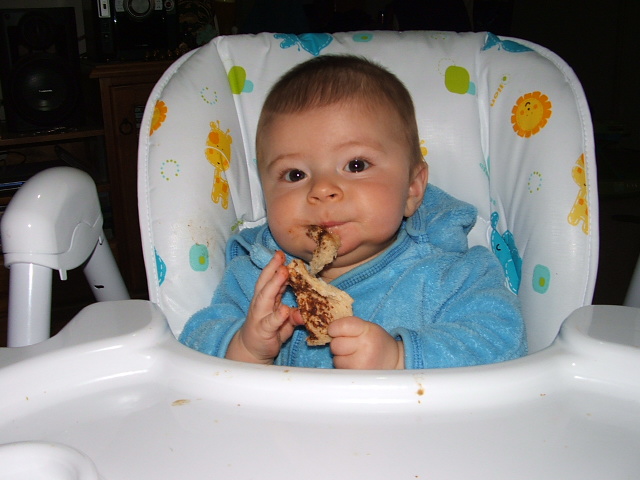
He's already got the perfect Vegemite eating technique downpat...
We started our mushy, messy adventure into solids around 3 months ago so breastfeeds have been steadily decreasing for a while. From birth, my boy had been a big lover of the boob - it was 2 hourly feeds during the day, and one or two at night, depending on whether he woke or not. That was equivalent to around 10 a day. I was firmly in dairy cow territory - it felt like a baby was permanently stuck to my breast and i was never, ever, ever going to be able to get him off or be able to go anywhere alone, ever again. Now? My little boy is having 3 meals of solids a day and usually 3-4 milk feeds. Only two of which ( on a good day ) are breastfeeds. After 6 weeks or so of trying, I've finally managed to get Flynn to take a bottle. A bottle you say? But i thought you were so pro-breastfeeding Amy? Well yes, i am, but the need to return to work ( and i mean need - if my bank account weren't hovering so close to a zero balance i would love to stay home... ) means i can't breastfeed during the day, and the decline in breastfeeding means i cant express enough booby juice - so its a formula bottle feed, twice a day at the very least. Happily, my community health nurse informs that he is now old enough to start drinking cows milk, so i dont have to buy expensive formula anymore!
So - i'm not sure how i feel about this whole weaning thing. I wanted him to start taking a bottle, needed him to do it so we didnt have any difficulties when we started daycare, but i didnt think he'd so easily drop his prior enthusiasm for booby-time. On one hand i love, love, love that it means i can have a little independence back - that i can have a morning sleep-in now that he doesnt need a breastfeed upon waking; that i could leave him with his Grandma and Poppy so i can have a haircut/eyebrow wax/go to the movies, without having to worry that my 2 hours of freedom before the next breastfeed is almost up; that i can spend the day at home with him without feeling like his own personal milk machine.
On the other hand, i'm going to miss the intimacy of breastfeeding. I love being able to look down at his fat little hand resting on my booby, his chubby little belly snuggled into me, and wondering at what Mick and I have created. I've found that i'm trying to keep that closeness while he has a bottle - i lean down and kiss his head, or stroke his arm or tickle his feet. I'm going to relish my freedom no doubt, but i'm going to mourn for that close breastfeeding bond.
So we're pretty much down to one, long, proper breastfeed a day - which happens to be in the middle of the night. When Flynn starts sleeping through again ( which i'm praying for ) that feed will be gone too. My baby is growing up! So how about you guys ladies? How did you feel when your bubbas left the booby?
The Gift of Life?
I'm just going to put it out there : organ donation. Will you or wont you? It seems like organ donation has been a hot topic in my little sphere the last few days, and it prompted me to thinking.

So will you or wont you ? For the record, I am on the Australian Organ Donor Registry as wanting to be an organ donor in the event of my death - i'll donate everything but my corneas ( which face it, arent all that good to me, so they arent really going to be much use to anyone else). Heart, liver, lungs, kidneys... whatever i have that will help, they can take. I might save one life, or half a dozen; all i know is that i'm not going to need my organs where i'm going ( wherever that may be ) so i'd like for them to help someone else live a good life. So, my mind is pretty much made up on the subject - in regards to myself. What got me to thinking was a Facebook status update from one of my friends, saying that everyone in her family was on the Registry. She confirmed for me, yes - even her kids. Her kids? She'd already made that decision? I wondered if i could do the same.
My son is only 7 and half months old - i dont even want to entertain the idea of having to give his organs away. In truth, i dont think i could i do what my friend has done. I dont think i could make that kind of decision without being in need of HAVING to make it. And, if i'm honest, i dont know that i would be able to give the doctors a "yes" if, and when, they asked.
Its fine for me to be happy to donate my own organs, but somehow its different when considering my baby. I know that theoretically my gorgeous son would be helping to save the life of another beautiful baby, someone elses pride and joy. But i dont know whether that thought would outweigh the idea of my baby being disected, his body being desecrated in someway. That might sound drastic, but i think thats how my mind would work, in that kind of situation. However, i wont know for sure until i have to walk in those shoes. Hopefully, i never will.... unlike my parents. For those of you who are not long time readers of this blog, let me elaborate: i had a younger brother, who died Christmas Eve of 1989. He was almost 2 years old, i was almost 6. He was struck, very suddenly, by menigitis and there was just no time ( and no resources in our country town ) to do anything to save him. My parents said no to donating his organs. I do not judge them in anyway for that decision. I know that my brother could have helped save the lives of a handful of other infants, but my parents could not, in the cold light of day, face the thought of having their little boy " chopped up " ( my fathers words not mine ). So, until i face something similar, i reserve the decision of donating my sons organs ( though not Micks - he has chosen not donate ) for a later date.
I like to think that my friend there on Facebook has made a brave decision, but somewhere in the back of my mind i cant help but think, in regards to her children, it may be a little rash. So how about you? Do you intend on donating your organs, and have you made those intentions clear to your loved ones?

So will you or wont you ? For the record, I am on the Australian Organ Donor Registry as wanting to be an organ donor in the event of my death - i'll donate everything but my corneas ( which face it, arent all that good to me, so they arent really going to be much use to anyone else). Heart, liver, lungs, kidneys... whatever i have that will help, they can take. I might save one life, or half a dozen; all i know is that i'm not going to need my organs where i'm going ( wherever that may be ) so i'd like for them to help someone else live a good life. So, my mind is pretty much made up on the subject - in regards to myself. What got me to thinking was a Facebook status update from one of my friends, saying that everyone in her family was on the Registry. She confirmed for me, yes - even her kids. Her kids? She'd already made that decision? I wondered if i could do the same.
My son is only 7 and half months old - i dont even want to entertain the idea of having to give his organs away. In truth, i dont think i could i do what my friend has done. I dont think i could make that kind of decision without being in need of HAVING to make it. And, if i'm honest, i dont know that i would be able to give the doctors a "yes" if, and when, they asked.
Its fine for me to be happy to donate my own organs, but somehow its different when considering my baby. I know that theoretically my gorgeous son would be helping to save the life of another beautiful baby, someone elses pride and joy. But i dont know whether that thought would outweigh the idea of my baby being disected, his body being desecrated in someway. That might sound drastic, but i think thats how my mind would work, in that kind of situation. However, i wont know for sure until i have to walk in those shoes. Hopefully, i never will.... unlike my parents. For those of you who are not long time readers of this blog, let me elaborate: i had a younger brother, who died Christmas Eve of 1989. He was almost 2 years old, i was almost 6. He was struck, very suddenly, by menigitis and there was just no time ( and no resources in our country town ) to do anything to save him. My parents said no to donating his organs. I do not judge them in anyway for that decision. I know that my brother could have helped save the lives of a handful of other infants, but my parents could not, in the cold light of day, face the thought of having their little boy " chopped up " ( my fathers words not mine ). So, until i face something similar, i reserve the decision of donating my sons organs ( though not Micks - he has chosen not donate ) for a later date.
I like to think that my friend there on Facebook has made a brave decision, but somewhere in the back of my mind i cant help but think, in regards to her children, it may be a little rash. So how about you? Do you intend on donating your organs, and have you made those intentions clear to your loved ones?
PKNA issue 5 - Portrait of the Young Hero p. 23-30


NEXT
Go to start of this issue
Go to list
----------------------------------
Let Disney know that you want to see an official translation of Paperinik New Adventures – here’s how!
Disney has already shown an interest in the characters – Superduck comics are now available in the US and the UK through Disney Digicomics! A growing archive of never-before-translated comics are now available.
DigiComics for PSP
A bit of info
Damn You YouTube!
A short note - due to the fact that i told Mick that watching videos on YouTube is entirely free, but did not explain that every video of a tractor pull that you watch adds to our download limit, we are now already over said limit for the month. Why am i telling you this you ask? Firstly to warn you about the evils of YouTube ( although it is also, simultaneously, entirely awesome and thats why you get addicted to it in the first place ) but also to let you know that if i post less in the next two weeks, or comment less on your blogs, it is not because i've fallen into a black hole. No, it is only because my internet connection, having gone over its 3MB per month limit, is now subject to " slowed connection speed " which means i may lose patience with how long it is taking for your page to load and just give up.
Now, please enjoy this picture of a tractor. I may direct Mick to my page and he can stare at this picture as long as he likes, instead of watching endless video of tractor races...

Now, please enjoy this picture of a tractor. I may direct Mick to my page and he can stare at this picture as long as he likes, instead of watching endless video of tractor races...

PKNA issue 5 - Portrait of the Young Hero p. 13-22


NEXT
Go to start of this issue
Go to list
----------------------------------
Let Disney know that you want to see an official translation of Paperinik New Adventures – here’s how!
Disney has already shown an interest in the characters – Superduck comics are now available in the US and the UK through Disney Digicomics! A growing archive of never-before-translated comics are now available.
DigiComics for PSP
A bit of info
Subscribe to:
Posts (Atom)


